Psychiatric Mental Health Nurse Practitioner
Congratulations on your acceptance
Checklist for a Successful Start
- Log in to your Bradley Bound page (application status portal). At the top of the page, click on the Post-Admission Checklist, which outlines the steps required to complete your account setup and onboarding process.
- Click on Activate Bradley Account to set up your BUNetID and BU email.
- After activating your accounts, save your login credentials in a secure location for future reference.
- Your BUNetID will serve as your username for accessing MyOnline, Bradley University's student portal, at MyOnline.bradley.edu, as well as other University systems.
Welcome Call with your Student Support Coach
- Add your Student Support Team’s contact information to your phone contacts and email address book.
- Schedule appropriate follow up calls with your student support coach to ensure your successful start in online classes.
Log on to MyOnline and:
- Review the MyOnline home page and become familiar with the information and resources available.
- Find your Academic Advisor information under the Academic Advisor tab.
- Find the Schedule tab in MyOnline to confirm your course registration – this will not be available until you have received an email with confirming instructions from the finance team. Any outstanding items can result in registration holds.
- Find your Program of Study in MyOnline under the Schedule tab.
- Read the Department of Nursing Graduate Student Handbook to understand the program requirements and expectations. The handbook can be found in the Other Resources tab.
- Visit the Viewpoint Screening site to create your health requirements account and select the 'Nursing - Graduate' package. For more information on health requirements please go to the Health Requirements tab in MyOnline.
- Typhon Portal credentials – Typhon log-in information will be sent to your BUMail account one or two weeks prior to your first clinical course. You must access it within 72 hours of receiving the email. If you have had access, but need a password reset, simply email budistanceeducation@fsmail.bradley.edu
- Under the Signature Confirmation tab, review all items. Once reviewed, sign all items as they are part of your health requirements.
Financial Services tab in MyOnline:
- Your semester bill will be available after you are enrolled in classes, and the finance team has created your statement.
- After receipt of statement from the finance team, you will confirm enrollment from this tab.
- If you are applying for financial assistance, complete the FAFSA application (school code 001641) and any other paperwork needed for processing.
New Student Orientation: A highly recommended and free course that allows you to learn to navigate your classes.
- Once you have paid your enrollment fee, you will automatically be enrolled in the new student orientation course. Access Canvas before classes begin to start and finish your orientation.
- Complete the Plagiarism Awareness module and quiz as part of the New Student Orientation.
BU Bookstore: You can order books, paraphernalia, and technology elements.
- View the link under the Schedule tab in MyOnline to order required textbooks once you are scheduled for classes.

Welcome From the Senior Academic Director of Online Education
Congratulations and welcome to Bradley University! As a graduate student, you are joining an elite group of professionals at an award-winning, well-respected institution. Our programs offer students the flexibility of online courses while providing a rigorous and challenging academic experience. We take pride in educating future nursing practitioners by providing courses designed to combine graduate-level coursework with a focused exploration of advanced practice skills. While you shouldn’t expect this program to be easy, in the end, it will be worth your efforts.
We look forward to your growth and development, both professionally and educationally, as you advance your leadership career. I wish you the best regards on your educational journey.

Ph.D., RN
Welcome from the Department of Nursing Chairperson
Welcome to the Department of Nursing at Bradley University! The Department of Nursing offers a variety of graduate nursing curriculums, which provide opportunities for students to further their foundational knowledge and advanced nursing practice skills. I am Dr. Rachel Borton, the Department of Nursing Chairperson.
We are pleased to have you join Bradley University and wish you the very best on your academic journey!

Ph.D., FNP-FPA
Welcome from the Program Director for PMHNP Programs
Welcome to the Bradley University PMHNP program! Regardless of track (RN-MSN, MSN, DNP or certificate), the online PMHNP program is a rigorous program, which provides opportunities for students to obtain broad knowledge and advanced skills to prepare them for the ANCC and AANP credentialing exam and work as a Psychiatric Mental Health Nurse Practitioner. My name is Dr. Jo Muller and I serve as the Program Director of the PMHNP Program.
As the Program Director, I work in coordination with Academic Advisors to review programs of study and address specific academic needs. I also serve as an escalation point for any concerns related to the PMHNP program.
Once again, we are pleased to have you join Bradley University.

Jo Muller,
DNP, APRN-FPA, FNP-C, PMHNP-BC
Welcome from Bradley University Student Support Team
Student support team
Academic advisor
- Academic standing
- Change in program request
- Basic overview of practicum and questions
- Academic grievances
- Review and approval of program of study
- Supervised clinical experiences
- Professional development questions and concerns
- Career options
- Personal challenges that may affect your academic success
Student support coach
- Proactive and intentional student outreach
- Information sharing and collection of student feedback, success stories, and challenges
- Coaching on time management, use of available resources, and self-care
- Virtual classroom navigation
- Point of contact for general questions on schedule information, confirming courses, and other general questions
Office of Online and Distance Education
- Course registration
- Assistance and support with registration holds
- Preceptor packets/site coordination and onboarding
- Clinical Agency Agreements
- Affiliation Agreements
- Health requirements/ViewPoint Screening
- Verifications needed for postgraduate credentialing
Course faculty
- Assignment feedback
- Assignment expectations
- Questions regarding course materials
- Assignment due dates
- Course assignment grades
Program Requirements
PMHNP Course Requirements
To satisfy graduation requirements for the PMHNP Certificate, students must successfully complete at least 36 credit hours and 750 clinical hours. Students who waive the 3P courses complete at least 27 credit hours. Students can complete the PMHNP Certificate program in 4 to 6 semesters following a prescribed scheduling sequence.
To satisfy graduation requirements for the RN-MSN PMHNP, students must successfully complete at least 60.5 credit hours and 800 clinical hours. Students can complete the RN-MSN PMHNP program in 10 semesters following a prescribed scheduling sequence.
To satisfy graduation requirements for the MSN PMHNP, students must successfully complete at least 51 credit hours and 750 clinical hours. Students can complete the MSN PMHNP program in 8 semesters following a prescribed scheduling sequence.
To satisfy graduation requirements for the DNP PMHNP, students must successfully complete at least 72 credit hours and 1000 clinical hours (750 specialty PMHNP hours). Students can complete the DNP PMHNP program in 11 semesters following a prescribed scheduling sequence.
More detailed information and resources regarding your Clinical can be found on MyOnline under the Clinicals tab.
Program of Study
Your Program of Study will be available through MyOnline by the mid-term of your first semester unless otherwise worked out with your Academic Advisor in advance as a result of transfer credits (see Department of Nursing Graduate Student Handbook for policy details on Transfer credits).
Students are required to maintain continuous enrollment. All students considering taking time off from the program must follow Bradley’s policy for dropping courses, leave of absence, or withdrawing from the program. Depending on your timing and specific Program of Study, your program completion date, and your financial assistance may be impacted.
Overview of Clinicals
Important Reminders:
- If a potential preceptor has an infraction on their license, they may not be approved. All licenses should be active and unencumbered for approval. Please reach out to the Program Director with any questions or concerns about license requirements.
- Please let us know if you move to a different state during your time as a student with us. You can change your address at the “Personal Information” tab on MyOnline. You must have an active and unencumbered nursing license for the state in which you plan to complete your clinical courses.
More detailed information and resources regarding your Clinical can be found on MyOnline under the Clinicals tab.
Registration and Textbooks
As an online student, you will be registered for your courses each term based on your Program of Study. Your Program of Study will follow the prescribed course sequence unless otherwise approved by your Academic Advisor. If there are any holds on your account (for issues such as unpaid fees, plagiarism quiz not passed, or other unmet requirements), you will not be registered.
Holds on your account are communicated in MyOnline. It is important that you resolve all holds immediately so course registration is not affected. Any student not registered for courses until after the first confirming deadline will incur a late registration fee of $50.
Each term, students are enrolled in classes and the finance team creates an email statement for how to confirm classes. Students will receive the statement via BU email. Once alerted, you must log in to MyOnline to confirm course registration, order your textbooks, and pay your semester bill as applicable to confirm your classes.
Required textbooks will be available through the Bradley Bookstore. Once textbooks for upcoming classes are confirmed and ready for purchase, Student Support will email students, typically four weeks before each start date. To order textbooks through the Bradley Bookstore, click on the Order Textbooks Online from Bradley Bookstore link under the Schedule tab in MyOnline. Acceptable payments include Visa, Mastercard, American Express, your Bradley Student ID card with cash loaded on it, and Barnes & Noble gift cards. Textbooks are typically shipped within five business days.
At the discretion of the instructor, additional course materials may be required once the course is available on Canvas. Students are responsible for the cost of all course materials. Please plan carefully to ensure you have all required materials by the time each course begins.
Policies and Procedures
Tuition and Fees
Each term prior to the start date, be sure to review your Current Balances in MyOnline under the Financial Services tab. As an online graduate student, you will incur tuition, as well as university and course fees. Please refer to this tuition page for current information regarding tuition and fees. You will also have out-of-pocket expenses for textbooks and course materials, which vary by course. For example, some courses may have fees associated with special software or other course-specific needs. Please review the list of courses and fees available in MyOnline under the Tuition and Fees section of the Financial Services tab.
Tuition and fee rates are approved annually by the Board of Trustees. The rates are subject to change at the beginning of each new academic year. Once tuition and fee amounts have been approved, updated information is made available to students via Bradley’s websites.
Other program fees:
- Technology Fee - $250/semester for graduate students registered for four credit hours or more. This fee goes toward acquiring, installing, and maintaining technologies and resources at the university level that further advance student success through digital access, an enhanced learning environment, academic innovation, and improved infrastructure and operations.
- Viewpoint Screening - $125 paid directly to Viewpoint Screening when you order the Nursing Graduate package.
- Typhon - $100 fee included in your first term tuition bill.
- Clinical Badge - $15 made payable to Bradley University.
- Malpractice Insurance Fee - $40-course fee added to tuition for each practicum course.
- UptoDate- Year Subscription - $200 fee added to NUR 684.
- APEA Certification Bundle - $475 course added to tuition for NUR 680 (one time charge utilized in all PMHNP courses).
Confirming Enrollment/Classes
Each semester, you must confirm your enrollment once you have been registered. This confirms that you will be attending classes for the term. To confirm your enrollment, go to the Financial Services tab on MyOnline and click on Current Balances.
- If you owe a balance – Click Make Payment. Pay online by credit card, through a bank account, or mail a check to Bradley University. On campus, you may pay at the cashiers’ window in Swords Hall. Please make a special note that payments take 24-48 business hours to process.
- If a refund is due to you – Click Initiate Refund. Select how you want to receive your refund, provide all requested information, and click Submit Request for Refund.
- If you have a zero balance – Click Claim Classes.
If you do not confirm your enrollment by 12:00 p.m. CDT on the deadline, your classes will be dropped. If your classes are dropped, you will need to contact Online and Distance Education by e-mail at budistanceeducation@fsmail.bradley.edu or by phone at 309-677-4398 to re-register as soon as possible. Once you are re-registered, payment will be due upon receipt of your statement. If payment is not made immediately, your classes may be dropped again. If you have questions about this process, please contact the Student Fees Office at 309-677-3120.
Dropping a Class or Withdrawing from the Program
Students who withdraw or drop on the first day (Day 1) of class will receive a 100% refund. Tuition begins accruing on Day 2. Bradley’s policies for dropping a class or withdrawing from the program are explained in detail in the Department of Nursing Graduate Student Handbook and in MyOnline. An overview of the most essential policies is provided below.
As a new student, if you are considering canceling or deferring your start date in the program, please contact Graduate Admissions as soon as possible to discuss your options and/or next steps. For students already registered for courses, the following steps are required to drop:
- Contact your Academic Advisor via your Bradley email to request an adjusted Program of Study. A change in course enrollment may affect the amount of time it will take you to complete the program.
- Contact Student Financial Services at 309-677-3120 or sfsonline@fsmail.bradley.edu to confirm how dropping a course will affect your financial assistance and/or billing.
- When ready, go to the Class/Grades tab in MyOnline and use the Drop Course Request Form to drop your course(s) or to withdraw from the program. The link for the Drop Course Request Form will walk you through all the necessary steps. Once you have completed this step, the system will send an email to all individuals/departments that need notification of your request. Your request will be processed on the same day.
- If you want to take a semester off, please contact your Academic Advisor who will assist you.
Registration Holds on Accounts
Health Requirements
All new students are required to complete health requirements that consist of a background check, 12-panel drug screen, immunizations. Students will create a Bradley University specific account and submit their information to the Viewpoint Screening tracking system. There is a fee of $125.00 that you will pay directly to Viewpoint Screening upon creation of your account. Please keep in mind this fee is subject to change. Your health requirements must be completed by midterm of your first semester of classes. If your health requirements remain incomplete after midterm, a registration hold will be placed.
Upon creation of your account, your background check will automatically be completed. Viewpoint Screening will email you the proper documentation and location of your drug screening. You will also be required to upload proof of the listed immunizations and documentation to the portal of your account. Students are expected to keep all health requirements which have renewal dates (i.e. CPR, license, flu) up to date while in the program. Health insurance is also required to be updated each February 1. If any health requirements have expired prior to a clinical rotation, a registration hold will be placed until the item is updated.
Under the Signature Confirmations tab in your MyOnline portal, students are also required to review and complete four items for signature. These items are a HIPAA and OSHA video, Permission to Share Health Records and Student Information, and Verification of Receipt of Graduate Student Handbook. Once all items are reviewed, please sign and ensure you hit the submit button.
More detailed information is provided in the Health Requirements section of your MyOnline portal.
Clinicals and Preceptor Packet Submission
For every clinical rotation, you are required to complete and submit a preceptor packet for approval. Preceptor packets are due by midterm of the semester prior to the clinical course start date. Preceptor packets are submitted through Docusign. Additional information and instructional videos regarding the Docusign process are available under the Clinicals tab in MyOnline.
Please contact your Academic Advisor or Distance Education at budistanceeducation@fsmail.bradley.edu with any questions.
Code of Conduct and Plagiarism Awareness Quiz
Course Grades and Academic Probation
Bradley University Technology
BunetID and BUMail Set-Up
Log in to your Bradley Bound page (application status portal). At the top of the page, click on the Post-Admission Checklist, which outlines the steps required to complete your account setup.
Click on Activate Bradley Account to set up your BUNetID and BU email. After activating your accounts, save your login credentials in a secure location for future reference.
Your BU email address will be your BUNetID@mail.bradley.edu and your password will be the same as your BUNetID password. Access your BU email account at <mail.bradley.edu> through any web browser.
Your BUNetID will serve as your username for accessing MyOnline, Bradley University's student portal, at MyOnline.bradley.edu, as well as other University systems.
All Bradley-related communications, such as schedules, student account messaging, course information, and announcements will be sent to your Bradley email address.
To ensure uninterrupted communication, please add to your safe lists so no important Bradley emails are blocked. Please be sure to use your Bradley email address to send any communication to Bradley University.
Online communication is much different from face-to-face communication and presents a unique set of challenges and expectations. When communicating with Bradley faculty and staff via email, be clear, and always include your name, ID#, and program in the body of your email. For more tips, please review the Email and Netiquette section of the New Student Orientation.
Bradley MyOnline
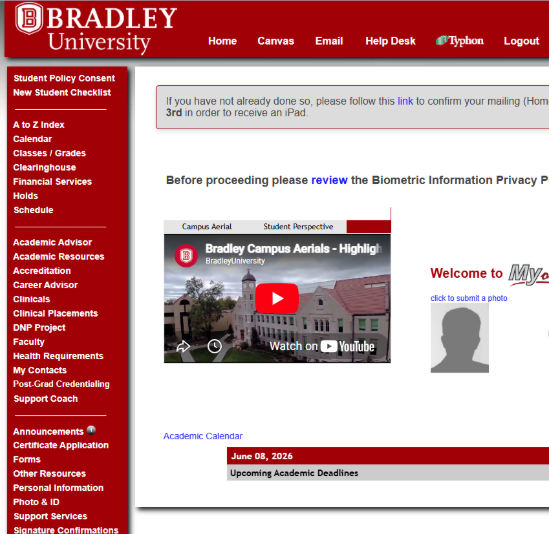
MyOnline is your interactive portal to the Bradley Graduate Nursing online learning environment. It is password protected and allows you to access personal and academic information and transact university business via the web. Your Admit Letter contains directions to set up your MyOnline portal at myonline.bradley.edu.
Through MyOnline, you will find information such as your course schedule, grades, academic calendar, financial services, faculty, and staff contact information, and required clinical information, as well as access to Canvas, BUMail, and the 24/7 Help Desk. MyOnline has many other features pertaining to your professional development, as well as resources to help you succeed in your academic program. Bookmark MyOnline so you can use it as your main information source throughout your time at Bradley. Be sure to explore MyOnline and view the MyOnline Tutorial Videos before the term begins. These can be found on the MyOnline homepage.
Canvas Learning Management System
Canvas is the Learning Management System (LMS) for all Bradley online courses.
The Canvas Quick Start Guide introduces Canvas and demonstrates how to navigate its features, including accessing important course documents and instructional content, participating in discussions with your peers, and completing learning activities and assignments.
Canvas Log-In Page:
- Once you have created a BUNetID and password, it will take up to 30 minutes for Canvas recognition. In rare cases, a new BUNetID might not work until the next morning.
- Technical support is available through the Help & Training button on the left-hand menu.
- Canvas Student Guide
Courses will be available at 8 a.m. on CDT the day the course starts.
If you experience any issues with your courses or with Canvas:
- Contact the 24/7 Helpdesk by dialling 866-570-5128 option 1
- Inform course faculty of your issue.
- Contact your Student Support Coach.
Technology Requirements
Graduate nursing students can utilize a desktop or laptop that meets the following minimum requirements, in addition to any University requirements.
PCs Must Meet the Following Minimum Criteria
- Operating System: Windows 10
- Processor: Core i5 (8th generation)
- Memory: 16GB RAM
- Storage capacity: 500GB hard drive (solid state drive)
- Integrated webcam or external webcam
Mac OSX Computers Must Meet the Following Minimum Criteria
- Operating System: Mac OS 13 Ventura or newer
- Processor: Core i5
- Memory: 8GB RAM
- Storage capacity: 256GB hard drive (solid state drive)
- Integrated webcam or external webcam
Software Recommendations
- Microsoft Office 365 for Windows and Mac (PowerPoint, Word, Excel, Access, Outlook and Publisher.)
- Students can download Microsoft Office from their Office 365 environment to their device.
- Adobe Acrobat Reader is available as a free download.
- Individual courses for all majors may require additional software specific to the course.
Web Browsers
- For Bradley Email functions, the University recommends using Google Chrome.
Technical Considerations
When completing assignments, taking online tests, or interacting in virtual meetings or discussion boards, we strongly advise students to use a wired internet connection and computer (as described above) to ensure reliable course participation. Online students should avoid using mobile devices for more than simple and brief reading or viewing of course materials. Android tablets, iPads, and smartphones are examples of mobile devices.
You may find that installing Firefox and Chrome browsers on your computer, and switching from one to the other, will solve technical glitches or problems when they arise.
The Technical and Academic Support tab in all Canvas courses lists the most up-to-date technology requirements. If you have specific questions about the technology used in the program, additional chat, phone, and online help are available here.
24/7 Helpdesk Support
Online Resources
New Student Orientation
Library Access

You can find helpful tutorial videos about Bradley’s library services.
For specific questions, please contact Bradley’s Sciences/Health Sciences Librarian, Michelle Nielsen Ott at mnielsenott@bradley.edu or 309-677-2840.
Campus Bookstore
Student ID and Clinical Badge
You will receive an email just prior to you starting classes asking you to order your Bradley student ID and clinical badge. You will need to upload a picture (headshot) of yourself and a government issued ID. Your picture will be used for multiple school databases as well as for your ID and clinical badge. A $15 charge will be added to your school account so that you may pay online. Once your ID and clinical badge are ready to be mailed, you will receive an email with a tracking number. You will be required to sign for the package.
More information can be found on MyOnline, under the Photo & ID tab.
Reasonable Accommodations for Students with Disabilities
The Office of Student Access Services (SAS) provides services to meet the individual needs of students with disabilities. Based on a student’s documented disability, the SAS works with the student and collaborates with faculty to ensure reasonable and appropriate accommodations and adjustments are provided.
To request accommodations from the university, the student must complete the following steps in the registration process:
- Document your disability. Provide us with diagnostic documentation about your disability and send the completed paperwork to our office via fax at 309-677-3685 or by mail to the SAS, Heitz Hall 100, 1501 W Bradley Ave., Peoria, IL 61625.
- Complete a Request for Disability Services and Accommodations Form. This helps us understand your strengths and challenges as a learner. This form is where you request the accommodations you need for access to programs, services, or activities.
- Contact our office. Please call our office to set up an intake interview with your disability coordinator. During this meeting, your coordinator will determine your eligibility for services and identify appropriate academic accommodations. For students enrolled in online programs, this meeting can be conducted by phone or Skype.
Until all steps of the registration process have been completed, the student will be considered pending and will not be eligible for services or accommodations. Incomplete files will be kept for one semester and then destroyed. The student may, however, begin the process again at any time.
The SAS is open Monday – Friday, from 9 a.m. – 5 p.m. and can be reached at 309-677-3654. You can fax information to 309-677-3685.
Veteran Services
Tips for Success
Tips for SUCCESS: Academic Writing
It is possible that you may be misunderstood. If you must clarify your posts, use an educated and toned-down language. Avoid offensive interactions.
If tension occurs, apologize, and offer clarification. Seek for a different perspective, and always avoid inflammatory or derogatory language.
Important Contacts
Questions
Contact: Support Coach
Email: studentsupport@onlinedegrees.bradley.edu
Phone: 866-570-5128, Option 2
Contact: Student Access Services (SAS)
Monday – Friday 9 am – 5 pm CDT
Phone: 309-677-3654